
Pageviews tell you a post was opened. Whether anyone read it is a separate question, and time on page and bounce rate are the two numbers most analytics tools offer for it. They’re also the two numbers that change most when you move from one tool to another, because each depends on a definition someone chose and on what the tracking code can see in the browser.
What the two metrics mean
Time on page is meant to say how long people spent with a page. Bounce rate is meant to say how many people arrived, saw one page and went no further.
Tools part ways on the details. Time can mean the tab being open or the reader looking at it, and a bounce can be counted per session or per visitor per day. Every tool also has to decide what to do about the last page someone sees before they leave.
Why tools disagree
Universal Analytics, Google’s previous analytics product, defined a bounce as a single-page session with no interaction, and gave a bounced session a duration of 0 seconds. It worked out time from the timestamps of the hits it received: a session ran from the first hit on the first page to the first hit on the last page, unless something on the last page sent another interaction.
That leaves the last page unmeasured. With nothing sent from it, the tool has a start time and no end time, so the page someone read before leaving adds nothing. For a one-page visit, that’s the whole visit. A reader who spent eight minutes on your guide and closed the tab was recorded as a zero-second bounce.
Background tabs go wrong in the opposite direction. Timestamps only measure the gap between two hits, so if a reader opens your post, switches to their email for twenty minutes and then clicks through to another post, those twenty minutes are credited to the first page.
Google Analytics 4 fixed both. It measures engagement time only while the page is in focus, and sends that time when the reader switches away or leaves, so the last page gets measured too. It launched without a bounce rate and reported engagement rate instead: the share of sessions that lasted longer than 10 seconds, had a key event, or had two or more page views. Google brought bounce rate to GA4 in July 2022, defined as the inverse of that, the share of sessions that weren’t engaged.
So under GA4, someone who reads one article for three minutes and leaves isn’t a bounce. Under Universal Analytics they were. If your bounce rate dropped the month you moved to GA4, the new definition is the likely cause.
How Vireo Analytics measures time on page
Vireo Analytics 0.13.0 counts visible time only. The clock runs while the tab is in front of the reader, pauses when they switch to another tab or app, and picks up again when they come back. The tracker sends the time when the reader switches away or leaves. Browsers treat that switch as the last moment a page can reliably report anything, so the last page of a visit gets its time like every other page.
Each view counts for at most 30 minutes, so one tab left open on a second monitor can’t drag the average up by itself.
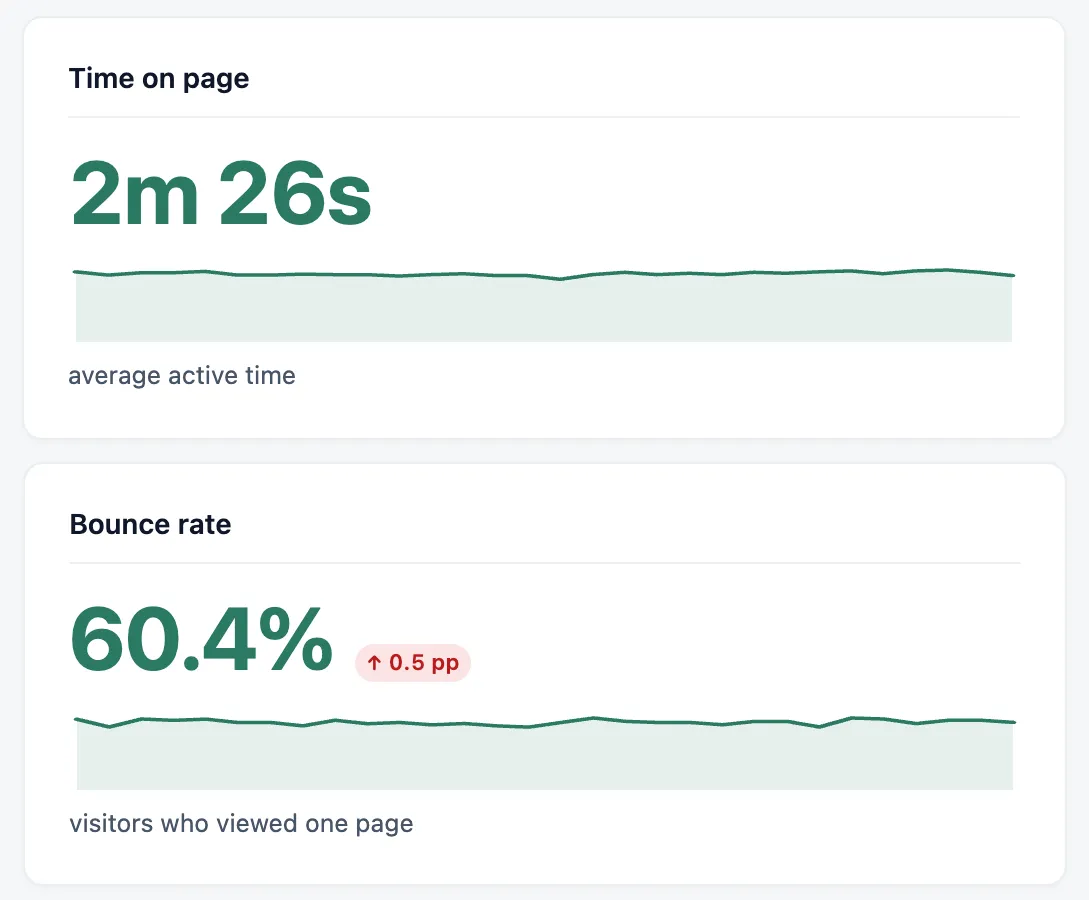
The average covers only the views that reported a time. Some never do: a page closed before the script ran, or a browser that never tells the page it was left. Vireo leaves those out, since counting them as zero seconds would pull the average down for reasons that have nothing to do with your writing. Hover over the line under the figure to see how many views it’s based on.
Time is accepted only for a page the same visitor has a counted pageview on that day, so bots and traffic you’ve excluded add none. The site-wide average is on the Overview, and each page’s average is in the Top pages list.
How Vireo measures bounce rate
Vireo works without cookies, so it has no sessions in the Google Analytics sense. Its bounce rate is the share of a day’s visitors who viewed exactly one page. A visitor is counted the way the Visitors card counts them, once per day, so someone who reads one post on Monday and another on Tuesday is a bounce on both days. Over a longer range, Vireo adds up each day’s visitors and bounces, then works out the share.
Time plays no part in it. A reader who spends ten minutes on one post and leaves is a bounce in Vireo. Keeping the two figures apart is what lets you tell a site where people read one page carefully from one where they leave at once.
When the numbers appear
Time on page starts counting when you update to 0.13.0, and bounce rate the day after. Visitors who arrived earlier on the update day were already counted before the bounce counter existed, so their second page would look like it came from someone missing from the total. On a new install, both start straight away.
Days before the update have neither figure, and neither do days you imported from Google Analytics, Jetpack or another tool. The cards only show what Vireo measured itself.
Both cards also show a dash while a country, device or source filter is on. They’re measured for the whole site, and a whole-site figure next to filtered totals would look as if it belonged to the filter.
How to read them on a WordPress site
A long tutorial and a contact page should have very different times, and the site-wide average blends them, so time is most useful in the Top pages list. Look down your long posts for the ones whose time sits well below the rest. Those are the posts people open and give up on.
What counts as a good bounce rate depends on what the site is for. A blog where most visitors arrive from search to answer one question will have a high one, and that can be fine, because they got their answer. A shop, or a site that needs people to reach a pricing or signup page, depends on that second page.
The direction tells you more than the level. With comparison on, the bounce rate card shows its change in percentage points and marks a rise as the bad direction. A rise that starts the week you changed your theme, your related-posts block or your internal links is most likely about that change.
In Vireo, bounce rate covers the whole site and time on page goes down to each page, so read them together. Suppose, hypothetically, your bounce rate sits around 70% and your guides average four minutes. People are reading and then leaving, and they need a next page to go to. If the same bounce rate comes with guides averaging twenty seconds, the problem starts earlier: check that each title and opening paragraph match the search or link that brought people in.
What not to conclude
A long time on page can mean a post is absorbing, or that someone is stuck on a confusing set of instructions. A high bounce rate on a site built around answering single questions is the expected result.
Expect Vireo’s figures to differ from GA4’s. GA4’s bounce rate is per session and leaves out anyone who stayed longer than 10 seconds. Vireo’s is per visitor per day and counts every visitor who saw one page, however long they stayed.
A page with only a few visits can show almost any average, so give a new post a few weeks before judging it.
And time on page measures how long the tab was in front of someone. That’s as close to attention as a browser gets, but it can’t tell you whether they were reading.
Going further with scroll depth
Scroll depth adds how far down the page people got. Vireo Pro has an Engagement card on the Content tab with average scroll depth and each page’s time and scroll. With Vireo Analytics 0.13.0 or later and Pro 1.4.2 or later, the card takes its time from the free plugin, so it matches the Overview. The docs page on what’s counted has the full definitions of both metrics.