
See which pages and visitors make you money.
Vireo Pro traces each sale to the page and source that brought the buyer, for WooCommerce, Easy Digital Downloads, FluentCart, Freemius, Paid Memberships Pro, Restrict Content, MemberPress, LifterLMS, GiveWP and SureCart stores. One plan, priced by how many sites you run, with a 30-day money-back guarantee.
Plans
Free
Any number of sites
$0 on WordPress.org
Traffic, imports, Search Console and AI assistants
Install free1 site
For your own site
$69 a year $5.75 a month, billed yearly
Buy for 1 site5 sites
For freelancers
$119 a year $9.92 a month, billed yearly
Buy for 5 sites25 sites
For agencies
$249 a year $20.75 a month, billed yearly
Buy for 25 sitesUnlimited sites
For larger agencies
Fair use of 100 sites$399 a year $33.25 a month, billed yearly
Buy unlimited
Every plan includes all of Pro and a 30-day money-back guarantee. Only the number of sites changes.
Count every site you’ll run it on, client sites included. You can move to a bigger plan later.
Vireo Analytics is exactly what I needed: a fast, clean dashboard, real human traffic with bots filtered out, no cookies and no consent banner. The cherry on top is the Google Search Console connection. Highly recommended!
I’ve tried a lot of WordPress analytics plugins over the years, and Vireo has the best interface of the lot. It gives you plenty of detail without the clutter, and it’s privacy-conscious, which is exactly what I want from analytics. It’s the one I’ve stuck with.
I’ve installed Vireo Analytics on my website, and it’s the simple and efficient solution I was looking for.
Revenue by page and source, on a demo store
Pro joins each order to the page the buyer landed on and the source that sent them, so you can see which posts and channels pay.
Revenue by landing page, last 7 days
The page each buyer arrived on first

- The revenue the page brought in.
- Orders per visitor who landed there.
- The post the buyer read first. It links to that post’s stats.
Revenue by source, last 7 days
Source, medium and campaign for each order

- Revenue from each source.
- A campaign tagged with UTM links gets its own line.
Free and Pro, feature by feature
Pro runs on top of the free plugin, which stays installed. Everything free still works the same, including your imported history.
| Feature | Free | Pro |
|---|---|---|
| Traffic | ||
| Pageviews, visitors, pages and referrers No cookies and no consent banner | ||
| Countries and devices | ||
| Bot filtering, with what it kept out | ||
| Time on page and bounce rate | ||
| Core Web Vitals for the whole site | ||
| Custom events and 404s | ||
| Notes pinned to a date | ||
| Year in review, imported years included | ||
| Popular posts block and view counts | ||
| Email digest and CSV export Daily, weekly or monthly | ||
| One headless front end Astro, Next.js and others | ||
| Multisite, with one view of the network | ||
| Reports for WP RSS Aggregator and Spotlight Feed clicks per source, Instagram feed activity | ||
| Search and AI | ||
| Google searches behind each post From Search Console | ||
| AI assistants as a traffic source | ||
| Pages AI crawlers took, against readers sent | ||
| PageSpeed test of any page | ||
| Searches made on your site | ||
| Ask Vireo about your traffic in plain words Answered by your own AI provider | ||
| Imports | ||
| Google Analytics 4 history | ||
| History from 8 other analytics tools Plausible, Jetpack Stats, Koko and more | ||
| Undo for each import Takes out exactly what a run added | ||
| Sales and sign-ups | ||
| Revenue by landing page and source WooCommerce, Easy Digital Downloads, FluentCart, SureCart, Freemius, MemberPress, Paid Memberships Pro, Restrict Content, LifterLMS and GiveWP | ||
| Goals and funnels | ||
| UTM campaigns | ||
| Outbound and affiliate link clicks | ||
| Clients | ||
| Dashboard access without admin rights | ||
| Other sites in the same dashboard | 1 | 1 to 100, by plan |
| Shareable dashboard links With an expiry date and a password | ||
| One AI connection for every client site | ||
| MainWP widget, site pages and report tokens | ||
| Deeper reports | ||
| Real-time visitors | ||
| Entry and exit pages | ||
| Where readers go next | ||
| Reports by author, post type and category | ||
| Cities and regions | ||
| Scroll depth | ||
| Core Web Vitals for each page | ||
| Traffic spike alerts | ||
| Email report written by your AI provider | ||
| Developers | ||
| MCP server for AI assistants | ||
| REST API and WordPress Abilities | ||
| Pro’s reports over MCP and REST | ||
| WP-CLI commands | Maintenance | Maintenance and reports |
| Support | ||
| Help from the team that builds Vireo | WordPress.org forum | Email, answered within 24 hours |
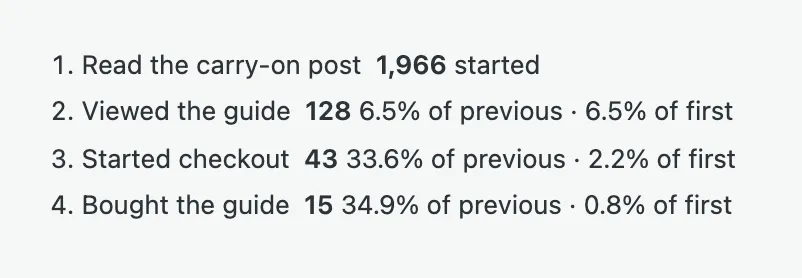
From a blog post to a sale
0.8% of the post's readers bought the guide
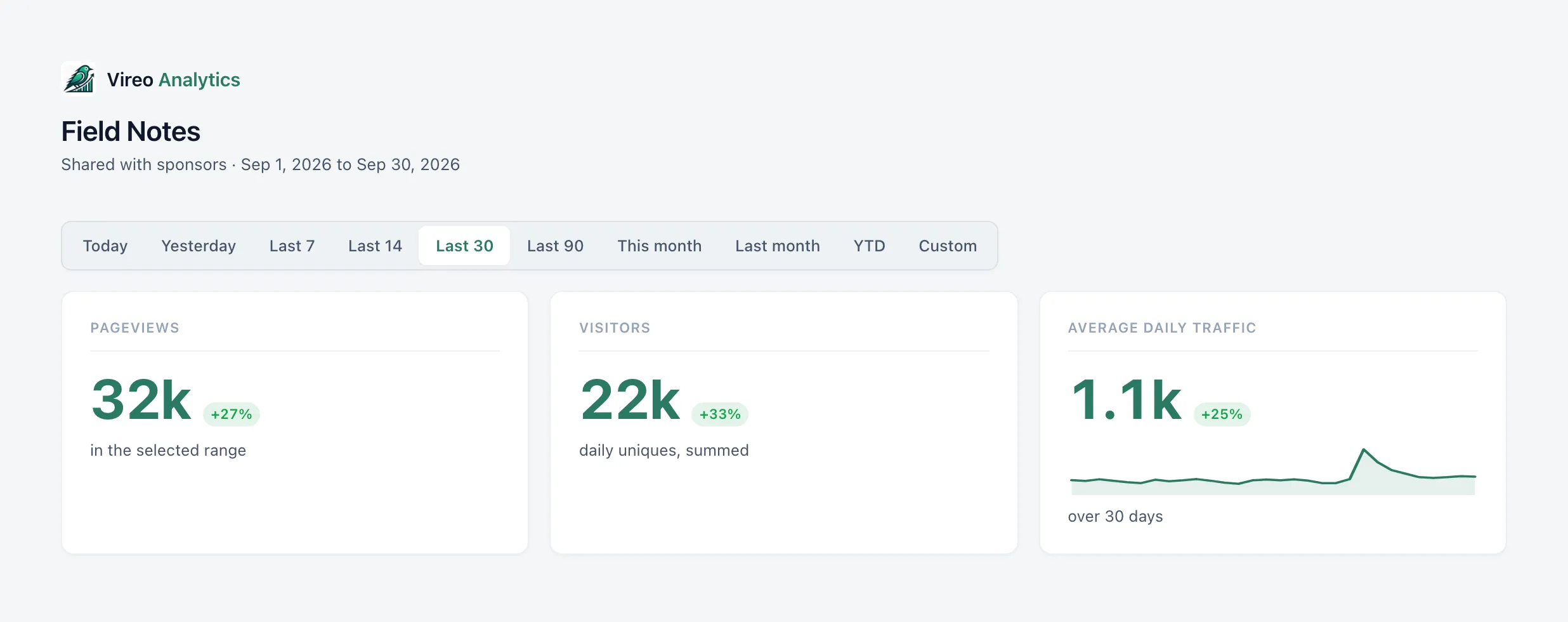
A shared dashboard, as your client sees it
Questions about buying Pro
- What counts as a site?
- Every WordPress site the license is active on is one site. Each WordPress site with Pro can connect sites up to the plan’s remaining allowance.
- Do I still need the free plugin?
- Yes. Pro runs on top of the free Vireo Analytics plugin from WordPress.org, version 0.10.3 or newer, which stays installed and active.
- How do I activate my license?
- Upload the Pro plugin under Plugins, Add New, activate it, then go to Vireo Analytics, License and enter the license key from your purchase email. Activating your license.
- How do updates arrive?
- Once the license is active, Pro updates appear on the normal WordPress Updates and Plugins screens, like any other plugin.
- Can I move my license to another site?
- Yes. Deactivate the license on the old site from the Account screen under Vireo Analytics, then activate it on the new one.
- What support comes with Pro?
- Send your question with the Pro support form. We answer Pro support requests within 24 hours, by email.
- Can I move to a bigger or smaller plan?
- Yes. Use the upgrade or downgrade link in the customer portal. Your license key stays the same. Freemius, which runs the checkout, takes the unused part of your last payment off the new plan’s price, and your billing year restarts on the day you change, so the new plan renews a year later at its renewal price. Before moving to a smaller plan, deactivate the license on the sites you’re dropping. Changing plans.
- Will my renewal price change?
- Each plan renews every year at the price shown on this page.
- How do I cancel, and what happens to Pro when I do?
- Cancel the renewal in the customer portal or by emailing vireo@rebelcode.com. Once the license lapses, the free plugin keeps working with all your data. Pro’s features switch off, what Pro had already recorded stays in your database, and renewing switches them back on.
- Are prices before tax?
- Yes. Prices are in US dollars, billed yearly. Checkout is run by Freemius, which adds any EU or UK VAT or US sales tax due, collects it and pays it to the tax authorities. Businesses with a valid VAT number aren’t charged VAT.
- Can I get a refund?
- Yes, within 30 days of buying, for any reason. Email vireo@rebelcode.com and we refund the whole payment. Refund policy.
Start with the free plugin
Install Vireo from WordPress.org, import your history, and add Pro when you want to see which pages make you money. Your data and settings carry over.
Get Vireo free