
An analytics dashboard answers the questions whoever designed it thought of. A site owner has their own, and they’re usually the same ones every month: is the site doing better than last month, and did the newsletter send anyone? If they won’t learn the dashboard, the questions land on whoever built the site. Agencies end up answering them by email, after opening the dashboard and reading the cards back to the client.
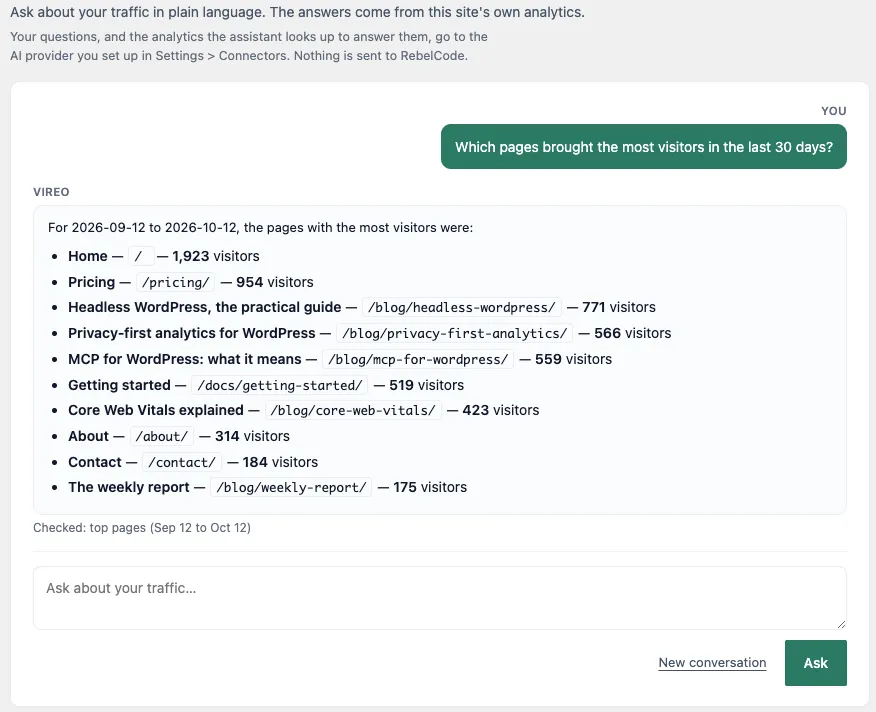
A language model is good at this kind of work, as long as it reads real numbers instead of guessing. We built Ask Vireo, a feature in Vireo Pro, for that case. It’s a page under the Vireo Analytics menu in wp-admin where you type a question and get an answer worked out from your site’s own analytics.
How a question gets answered
Ask Vireo runs on the AI client that WordPress added in version 7.0. A plugin hands the client a prompt, and WordPress sends it to whichever AI provider the site’s administrator has set up under Settings, Connectors. Vireo keeps no API key of its own, and on WordPress older than 7.0 the page says it needs an update.
The model doesn’t get your database. It gets a list of tools, and each tool is one of Vireo’s read-only abilities: top pages, referrers, what changed against the previous period, countries, campaigns, Search Console searches and the rest of what the dashboard covers. The model picks the tools that fit the question, WordPress runs them on your site as the logged-in user, and the results go back to the model, which writes the answer.
That loop has limits, set in the code. A question gets up to 4 rounds of lookups and 8 lookups in all. After that, the model gets no more tools and has to answer with what it has. Each person can ask 60 questions an hour, and a question can be up to 2,000 characters long.
Under every answer, a line says what was looked up and for which dates, such as “Checked: top pages (Sep 12 to Oct 12)”. Open the same report for the same dates on the dashboard and you can see where every number came from.
Which AI providers it works with
Ask Vireo uses whatever the WordPress AI client can reach. WordPress core doesn’t include any providers. Settings, Connectors features three of them: Anthropic, Google and OpenAI. You install and connect each one from that screen. Community plugins add others, such as Mistral, OpenRouter and Ollama, and any provider that registers with the AI client shows up as a connector.
You add the key once, and every plugin that uses the AI client shares it. If you already get the AI-written weekly report, Ask Vireo works straight away.
What leaves your site
The privacy question here is about your AI provider. Nothing goes to RebelCode. Everything below goes to the provider you connected:
- your question, and the text of the conversation so far, so that follow-ups work
- an instruction Vireo writes, which includes the site’s name, its address, its timezone and its language
- the result of every lookup the model asks for
Those results are the same aggregated figures your dashboard shows: totals, and lists of pages, referring sites, countries and campaigns with their counts. None of the lookups returns a row about one visitor. Pro’s live dashboard does keep per-visitor trails, and the real-time lookup turns them into counts before the model sees anything.
Aggregated still includes words. Page paths, campaign names and the terms people typed into your site’s search box all appear in those results. If visitors sometimes type their email address into your search box, a question about site searches can send that to the provider. Vireo strips line breaks, brackets and backticks from visitor-supplied text before the model sees it, and its instructions tell the model to report such text as data. If a crafted referrer did talk the model into something, every tool it could reach only reads.
Conversations aren’t stored on your server. The current one lives in your browser tab and is gone when you close it. What the provider keeps is set by its own terms, so read them before you ask about a client’s site.
Questions worth asking
The best questions are the ones that need two or three reports put together. A few that work well:
- What changed this week compared to last week?
- Which referrers are growing?
- Which campaigns sent the most visitors this month?
- What did people search for on the site and find nothing?
- Which pages load slowest for real visitors?
Follow-ups carry on from the last answer, so “and the month before?” works. When you name no period, Ask Vireo uses the last 30 days.
With a store connected, revenue questions work too, such as which sources drove sales this month. On a site with no store, Ask Vireo says there’s no revenue data instead of making some up.
Checking answers and cost
Ask Vireo answers from what Vireo records, and from history you’ve imported. Vireo tells the model to answer only from what it looked up, and the “Checked” line under each answer shows which lookups it ran, so you can test it. For a figure you’ll put in a client report, open the dashboard and confirm it.
A question can take up to five calls to the model, and they’re billed to the API key in Settings, Connectors. Anyone with access to the Vireo dashboard can use the page, so if you’ve given clients dashboard access, their questions use your key too.
How it differs from connecting Claude over MCP
Free Vireo already runs an MCP server, so you can connect Claude or Cursor and ask the same kind of question from the assistant you already use. Ask Vireo calls the same tools, and the two answer most questions the same way. The difference is where they run and who sets them up.
MCP suits someone who lives in an AI assistant. Each person creates an application password and adds the connection to their own assistant, and the questions run on their own Claude or Cursor plan. That person can ask about Vireo’s numbers and their code or documents in the same chat. With Pro, one connection can also answer for every client site. Ask Claude about your WordPress analytics covers connecting an assistant.
Ask Vireo suits the people who’ll never set that up. One administrator connects a provider, and everyone with dashboard access gets a box to type into, inside the WordPress admin they already log into. It answers about the site it’s installed on.
The Ask Vireo docs cover the settings, the two developer filters and what each error message means.