
Ask Vireo is a chat page in wp-admin. You type a question about your site’s traffic, and the answer comes from the same analytics you see on the dashboard. You don’t have to install anything else or connect an outside app.
Where to find it
Go to Vireo Analytics, Ask. It sits under Live in the Vireo menu. Anyone who can see the Vireo dashboard can use it, which means anyone with the view_vireo_analytics capability. See Roles and access.
What it needs
- Vireo Pro with an active license.
- WordPress 7.0 or newer. WordPress 7.0 added a built-in AI client, and Ask Vireo runs on it.
- An AI provider set up under Settings, Connectors. That’s where you add your Anthropic, Google or OpenAI key, once, for every plugin that uses it. Vireo stores no API key of its own.
On older WordPress, the page says it needs WordPress 7.0 or later. With no provider set up, it says so and links to Settings, Connectors.
If you already get AI-narrated email reports, the provider is already set up and Ask Vireo works straight away.
What you can ask
An empty conversation offers questions to start with. Click one to send it:
- What changed this week compared to last week?
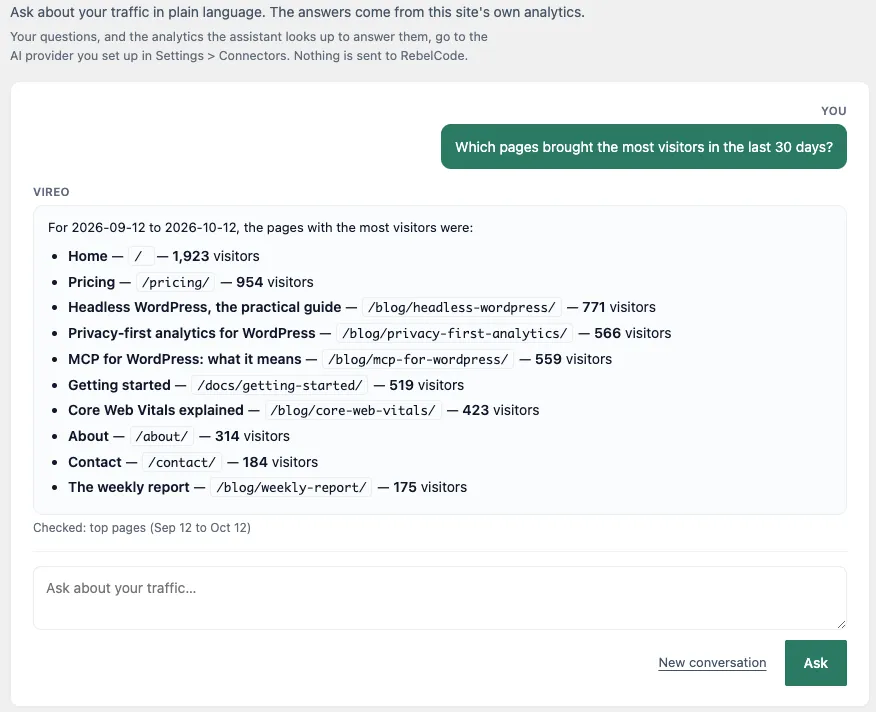
- Which pages brought the most visitors in the last 30 days?
- Where is my traffic coming from?
- Which referrers are growing?
- Who is on the site right now?
- Which sources drove revenue this month? (only with a store connected; without one you get “Which countries do my visitors come from?” instead)
You can type your own questions too. Ask Vireo uses the same tools an AI assistant connected over MCP gets, so it can look up most of what the dashboard covers. That includes:
- totals, trends and what changed between two periods
- pages, entry and exit pages, authors and post types
- referrers, traffic channels and campaigns
- countries, cities and devices
- events, site searches, outbound clicks and downloads
- Search Console searches and Core Web Vitals
- AI crawlers and the readers AI assistants send you
- goals, funnels and live visitors
- revenue, products and revenue by source when a store is connected
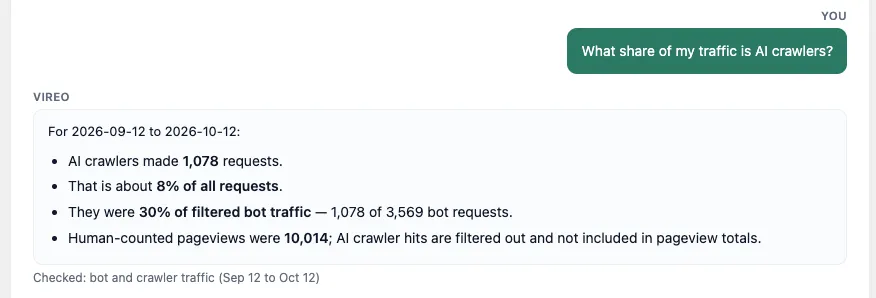
A follow-up question carries on from the last answer, so “and the week before?” works. New conversation clears it and starts over.
When you name no period, Ask Vireo uses the last 30 days. “This week” means the last 7 days, compared with the 7 before. Every answer says which dates it covers.
The “Checked” line
Under each answer, a short line lists what Ask Vireo looked up, with the dates of each lookup, for example “Checked: top pages (Sep 12 to Oct 12)”. It tells you where the numbers came from, so you can open the same report on the dashboard and compare. While it works on an answer, the same line shows “Checking top pages…” as each lookup runs.
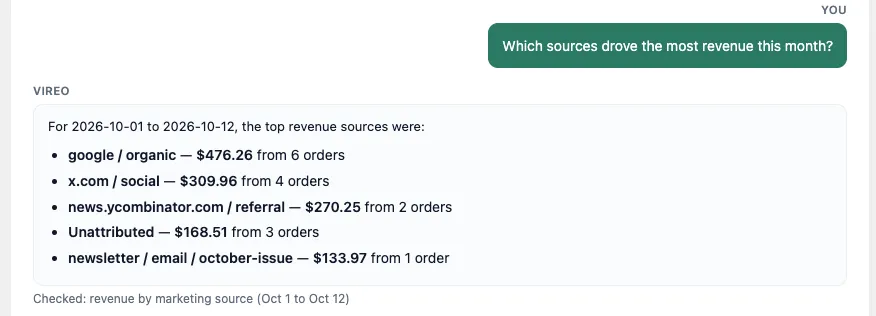
Ask Vireo answers only from what it looked up. When the data can’t answer a question, for example a revenue question on a site with no store, it tells you what’s missing instead of guessing.
Limits
- Each question gets up to 4 rounds of lookups and 8 lookups in all. After that, Ask Vireo answers with what it has.
- Each person can ask 60 questions an hour. Past that, the page asks you to try again a little later.
- A question can be up to 2,000 characters long.
- Answers arrive whole, after the lookups finish, rather than word by word.
If your AI provider limits requests, rejects the key, or can’t be reached, the conversation shows a plain message saying which, with a pointer to Settings, Connectors when the key is the problem.
Privacy
Your questions, and the analytics Ask Vireo looks up to answer them, go to the AI provider you set up in Settings, Connectors. Nothing goes to RebelCode. The analytics it sends are the same aggregate numbers the dashboard shows, with no data about individual visitors.
Conversations aren’t stored on the server. The current conversation lives in your browser tab’s session storage and is gone when you close the tab. While an answer is being worked out, the site holds its progress for up to 10 minutes, then deletes it.
Your AI provider’s own terms decide what it keeps. Check them before you ask about a client’s site.
Read-only
Ask Vireo can only read analytics. It has no tool that changes a setting, deletes data, or touches anything else on the site.
Text that visitors control, like a referrer address, a search term or a 404 path, can reach Ask Vireo as data. If that text looks like an instruction, Ask Vireo reports it as data and doesn’t act on it. With nothing but read-only lookups available, it has nothing it could act on anyway.
For developers
Two filters adjust it:
vireo_ask_toolsnarrows or widens the abilities Ask Vireo may use. Only read abilities whose names start withvireo-analytics/get-are ever used, whatever the filter returns.vireo_ask_system_promptchanges the instruction it starts each question with.
To steer which model it uses, use vireo_ai_model_preference, the same filter AI-narrated email reports use.