
Vireo Pro
Easy Digital Downloads analytics: sales by source
Vireo Pro records Easy Digital Downloads sales and refunds as they happen and credits each one to the source, campaign and landing page that brought the buyer.
- Plan
- Vireo Pro
- Set-up
- None. Detected when Easy Digital Downloads is active.
- Where
- Vireo Analytics, Revenue
What it records
- Completed purchases.
- Refunds. With EDD 3, partial refunds are added up from its refund records, and only a full refund removes the order from revenue.
- Download page views and checkout starts, for the purchase funnel and Top products.
Set it up
- Install Vireo Analytics and activate Vireo Pro with your license.
- Keep Easy Digital Downloads active. Pro records sales from then on with nothing to configure.
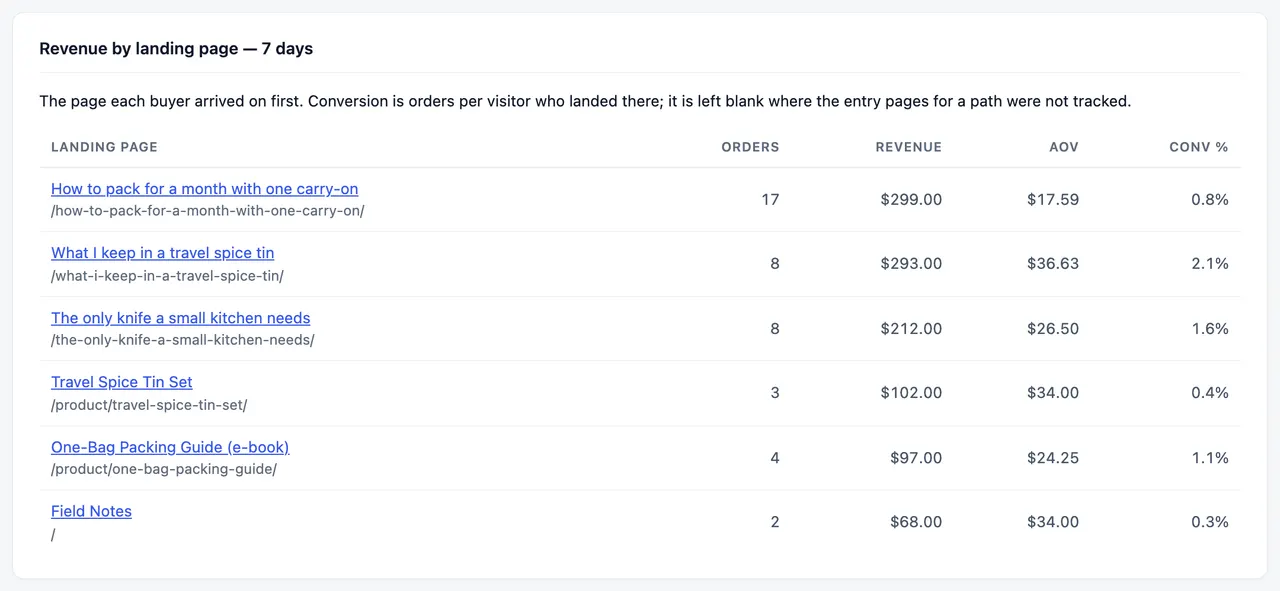
- Open Vireo Analytics, Revenue for revenue by source, by landing page and by download.
Free or Pro
Vireo Pro. See pricing.
Worth knowing
- Sales are matched to a visit from the last 48 hours at most. Slower decisions show as direct.
- Sales from before Pro was installed aren't imported.
Docs
Related integrations
Try Vireo on your own site
Vireo Analytics is a free WordPress plugin. It counts visits without cookies and keeps everything in your own database. Vireo Pro adds revenue, goals and the rest.
Get Vireo free on WordPress.org