
Vireo Pro
WooCommerce analytics without Google Analytics
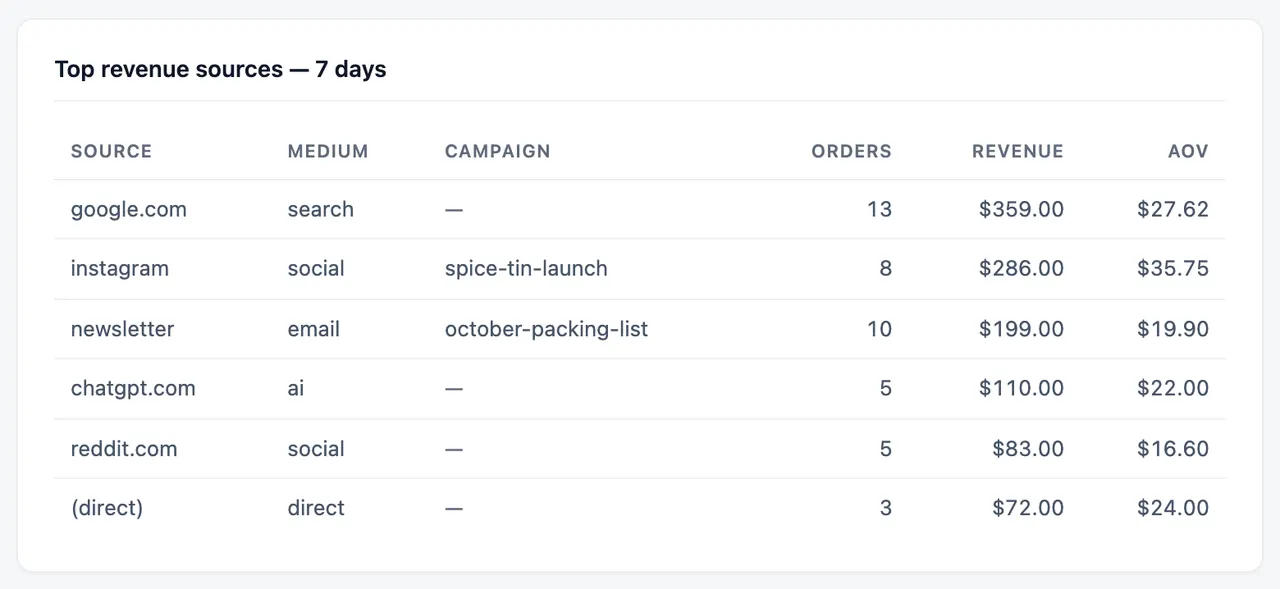
Vireo Pro records WooCommerce orders and refunds on your own server and matches each sale to the source and landing page that brought the buyer, with no cookies and no Google tag.
- Plan
- Vireo Pro
- Set-up
- None. Detected when WooCommerce is active.
- Checkout
- Classic checkout and the block checkout
- Where
- Vireo Analytics, Revenue
What it records
- Orders once WooCommerce marks them paid (processing or completed). An order waiting on a bank transfer counts when it's paid and keeps the source that brought the buyer.
- Full and partial refunds. A partial refund takes only the refunded amount off.
- Product views, add to cart and checkout starts, for the purchase funnel.
- WooCommerce Subscriptions renewals, counted as revenue but not as new conversions, and credited to whatever brought in the first order.
Set it up
- Install Vireo Analytics from WordPress.org and activate Vireo Pro with your license.
- Keep WooCommerce active. There's nothing to configure: Pro starts recording orders from that moment.
- Open Vireo Analytics, Revenue. Today's revenue and orders also appear on the Overview's Campaigns tab.
Free or Pro
Vireo Pro adds orders and revenue. The free plugin counts store pages like any other page. See pricing.
Worth knowing
- A buyer is matched to their visit from the last 48 hours, using the same daily secret that counts visitors without cookies.
- Each order keeps its currency.
Docs
Related integrations
Try Vireo on your own site
Vireo Analytics is a free WordPress plugin. It counts visits without cookies and keeps everything in your own database. Vireo Pro adds revenue, goals and the rest.
Get Vireo free on WordPress.org