
Vireo Pro
MainWP analytics: visitors and pageviews for every site
Vireo Pro on each child site answers MainWP's signed requests, so the MainWP dashboard can show every site's traffic in one place without another analytics account.
- Child sites
- Vireo Analytics, Vireo Pro and MainWP Child
- Dashboard
- Vireo Pro, licensed on the MainWP dashboard site
- Connection
- MainWP's own signed connection
What you get
- On each sync, the visitor and pageview totals, top pages and top referrers for the last 7 and 30 days.
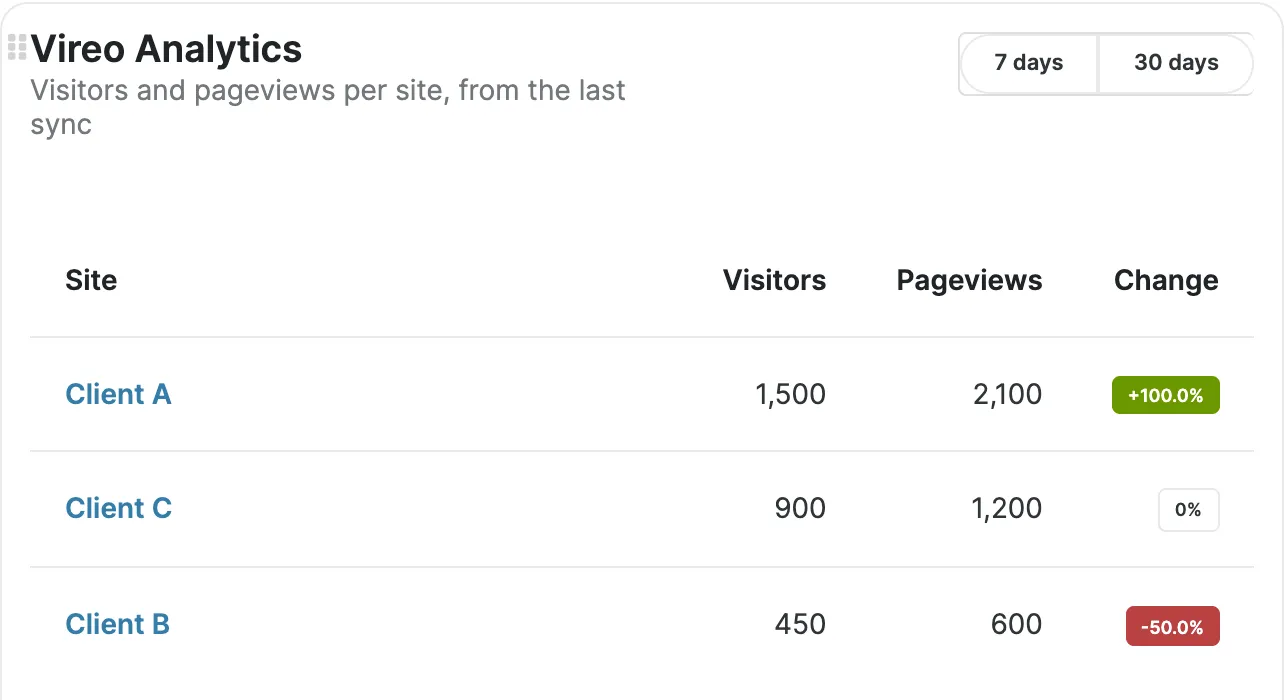
- An Overview widget on the MainWP dashboard: visitors and pageviews per site from the last sync, with the change.
- A Vireo Analytics page per child site, fetched live, with top pages and top referrers.
- Pro Reports tokens for client reports: [vireo.visitors], [vireo.visitors.change], [vireo.pageviews], [vireo.pageviews.change], [vireo.top.pages] and [vireo.top.referrers].
- With an AI assistant connected to the MainWP dashboard, answers about each site from Vireo's read-only reports.
How a child site answers the dashboard
- Vireo Pro on each child site hooks into MainWP Child through mainwp_site_sync_others_data and mainwp_child_extra_execution, after MainWP Child has verified the dashboard's signature and logged in the connected administrator.
- On every sync, the dashboard can ask for the last 7 and 30 days: totals, top pages and top referrers.
- For the per-site page and report tokens, the dashboard asks for a range on demand.
- For an AI assistant connected to the dashboard, a child runs only Vireo's read-only abilities, whose names start with vireo-analytics/, through WordPress's own ability permission checks.
Set it up
- On each child site, install Vireo Analytics, Vireo Pro and MainWP Child, and activate the Pro license.
- On the MainWP dashboard site, install Vireo Pro and activate its license.
- Sync your sites. The widget fills from the next sync.
Vireo Pro includes what used to be the separate Vireo Analytics for MainWP add-on. If that add-on is still active, Pro steps aside for it.
What you'll see
- MainWP Overview: the Vireo widget with visitors and pageviews per child site from the last sync, and the change for each.
- A Vireo Analytics page for each child site, fetched live, with top pages and top referrers.
- In MainWP's Pro Reports, tokens such as [vireo.visitors] and [vireo.top.pages] fill with each site's numbers.
Free or Pro
Vireo Pro on the MainWP dashboard and on each child site. Child sites count toward your plan's sites. See pricing.
Worth knowing
- Aggregate counts and read-only reports pass to the dashboard, with nothing about individual visitors.
- Each child site answers the dashboard once Vireo Pro is active on it.
- To switch it off on one site, a developer can return false from the vireo_mainwp_enabled filter.
Questions
Where does Vireo Pro need a license?
On the MainWP dashboard site and on each child site. Child sites count toward your plan's sites.
I already run the separate Vireo Analytics for MainWP add-on.
Pro steps aside for it while it's active, and provides the same widget, per-site page and tokens once you deactivate it.
What leaves a child site?
Totals, top pages and top referrers for the range, and the answers of read-only reports. Individual visitors stay on the child.
Docs
Related integrations
Try Vireo on your own site
Vireo Analytics is a free WordPress plugin. It counts visits without cookies and keeps everything in your own database. Vireo Pro adds revenue, goals and the rest.
Get Vireo free on WordPress.org