
Vireo Pro
FluentCart analytics: revenue, funnel and sources
Vireo Pro reads FluentCart's own order events, so paid orders, refunds and the steps before a purchase are recorded on your own server, where an ad blocker can't hide them.
- Plan
- Vireo Pro
- Set-up
- None. Detected when FluentCart is active.
- Where
- Vireo Analytics, Revenue
What it records
- Paid orders, including offline orders once they're paid.
- Full and partial refunds, and order and payment status changes.
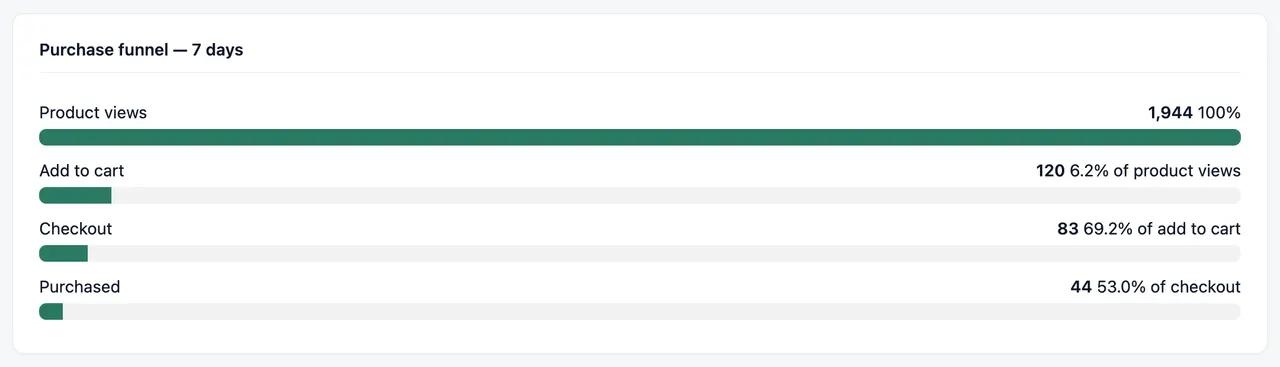
- Product views, checkout starts and receipt views, which feed the purchase funnel: product views, add to cart, checkout, purchased.
Set it up
- Install Vireo Analytics and activate Vireo Pro with your license.
- Keep FluentCart active. Recording starts straight away.
- Open Vireo Analytics, Revenue. A funnel step your store doesn't report is shown as "Not tracked on this store".
Free or Pro
Vireo Pro. See pricing.
Worth knowing
- Sales are matched to a visit from the last 48 hours at most.
- Totals use your first store's currency without conversion.
Docs
Related integrations
Try Vireo on your own site
Vireo Analytics is a free WordPress plugin. It counts visits without cookies and keeps everything in your own database. Vireo Pro adds revenue, goals and the rest.
Get Vireo free on WordPress.org