
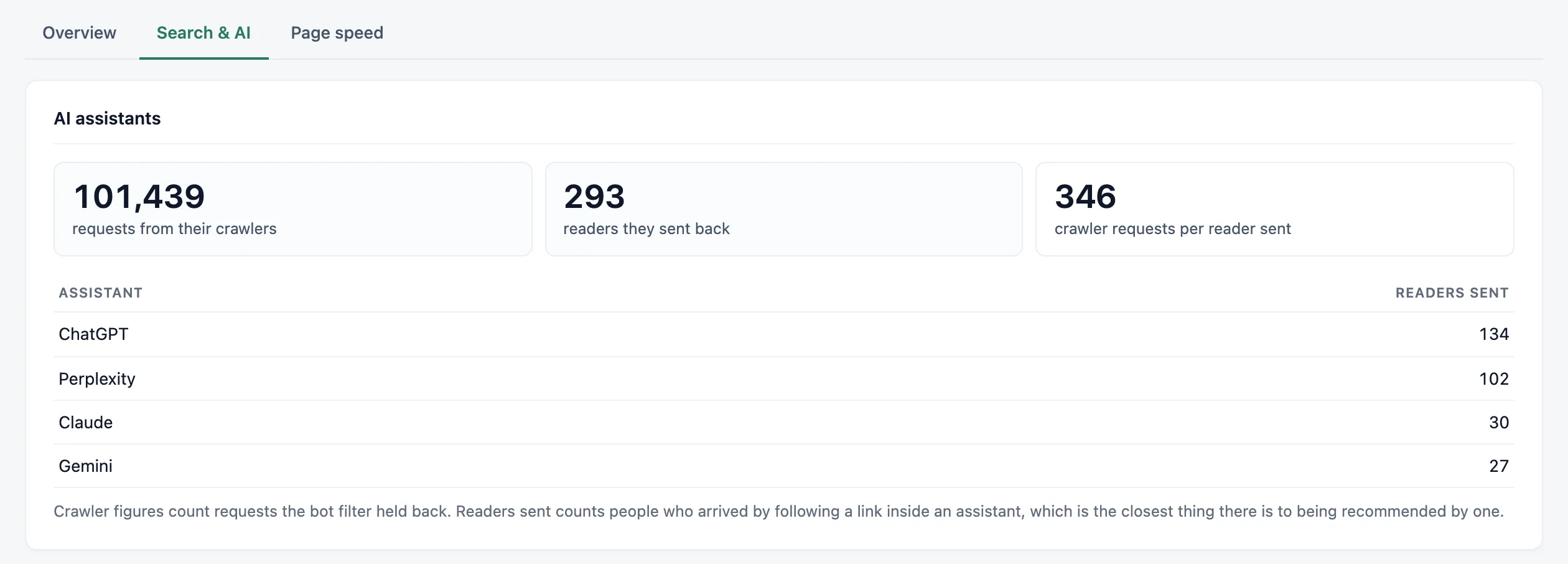
The AI assistants card is on the Search & AI tab of the Overview. It puts two numbers side by side: what AI companies’ crawlers took from your site, and the readers their assistants sent back.
The three numbers
- “requests from their crawlers”: requests from AI crawlers that the bot filter held back.
- “readers they sent back”: visitors who followed a link inside an AI assistant.
- “crawler requests per reader sent”: the first number divided by the second.
All three cover the same days. If Vireo started counting crawlers part-way through your range, the card starts there too and says so: “Since” that date. Earlier days have readers but no crawler figures, so leaving them in would make the ratio look smaller than it is.
The table lists each assistant with the readers it sent. The card only appears once an AI crawler or an assistant has touched your site.
Assistants Vireo recognises
ChatGPT, Claude, Gemini, Perplexity, Copilot, DeepSeek, Grok, Mistral, Poe, You.com, Phind and Meta AI. They’re matched by the address of the link the reader followed, and the same visits appear under AI assistants in Where visitors come from.
A developer can add or change assistants with the vireo_ai_sources filter.
AI visibility scan
Below the AI assistants card, the AI visibility scan checks what could stop AI crawlers and assistants from reading and citing your site.
Under “Page to scan”, enter a path like /about/ or a full address on your site. It starts with your home page. Click “Run the scan”. Only administrators see the button; other users see the last result. The scan takes up to half a minute.
Your server fetches the page, robots.txt, llms.txt and your sitemap from your public address, logged out, the way a crawler does. It also requests the page as GPTBot, ClaudeBot and PerplexityBot.
The result is a score out of 100, with a percentage for each of four groups:
- AI crawler access: whether
robots.txtlets AI search and training crawlers in, whether the page carries a noindex or “noai” instruction, and whether your server answers requests that identify as AI crawlers. - Content AI can read: text in the HTML without JavaScript, one clear H1, sections under H2 headings, FAQ content, image alt text and a declared language.
- Structured data: Organization or LocalBusiness markup with
sameAslinks, machine-readable contact details, Open Graph tags and a canonical URL. - Discovery files: an XML sitemap and an
llms.txtfile.
Each check shows Pass, Warning or Fail, and every one that isn’t a pass says what to change. If the scan runs out of time, the checks it didn’t reach show “Not run” and are left out of the score. Run it again once your site responds faster.
Blocking training crawlers is a business choice, so that check explains the trade-off instead of just asking you to unblock them. If your server fails the crawler check while robots.txt allows them, a firewall, CDN or security plugin is probably blocking AI bots. Hosts that verify real crawlers by IP address can reject these test requests, so that result can be a false alarm.
The scan’s own requests carry a one-time token. They’re left out of the crawler figures, the missing pages report and your pageviews.
What the crawler count can’t see
Crawlers are counted when they ask WordPress for a page. On a site with full-page caching, a cached page is answered before WordPress runs, so the real number of crawler requests is higher than the card shows.
On a headless site, the count covers requests to WordPress only. Requests crawlers make to the front end never reach it.
Over a whole year
The Year in review has the same numbers for the year, counted from the day Vireo started counting crawlers. Imported history from other tools has no crawler data.
Finding what’s in the way
The AI visibility scan, on the same tab, checks whether your robots.txt, firewall, page content and discovery files let AI crawlers in. Vireo Pro lists the pages assistants send readers to and alerts you when crawler requests drop off.
Which crawlers are which
The bot directory lists every AI crawler Vireo knows, with who runs it and how to block it in robots.txt.