
Everything lives under Vireo Analytics, Overview in the WordPress admin.
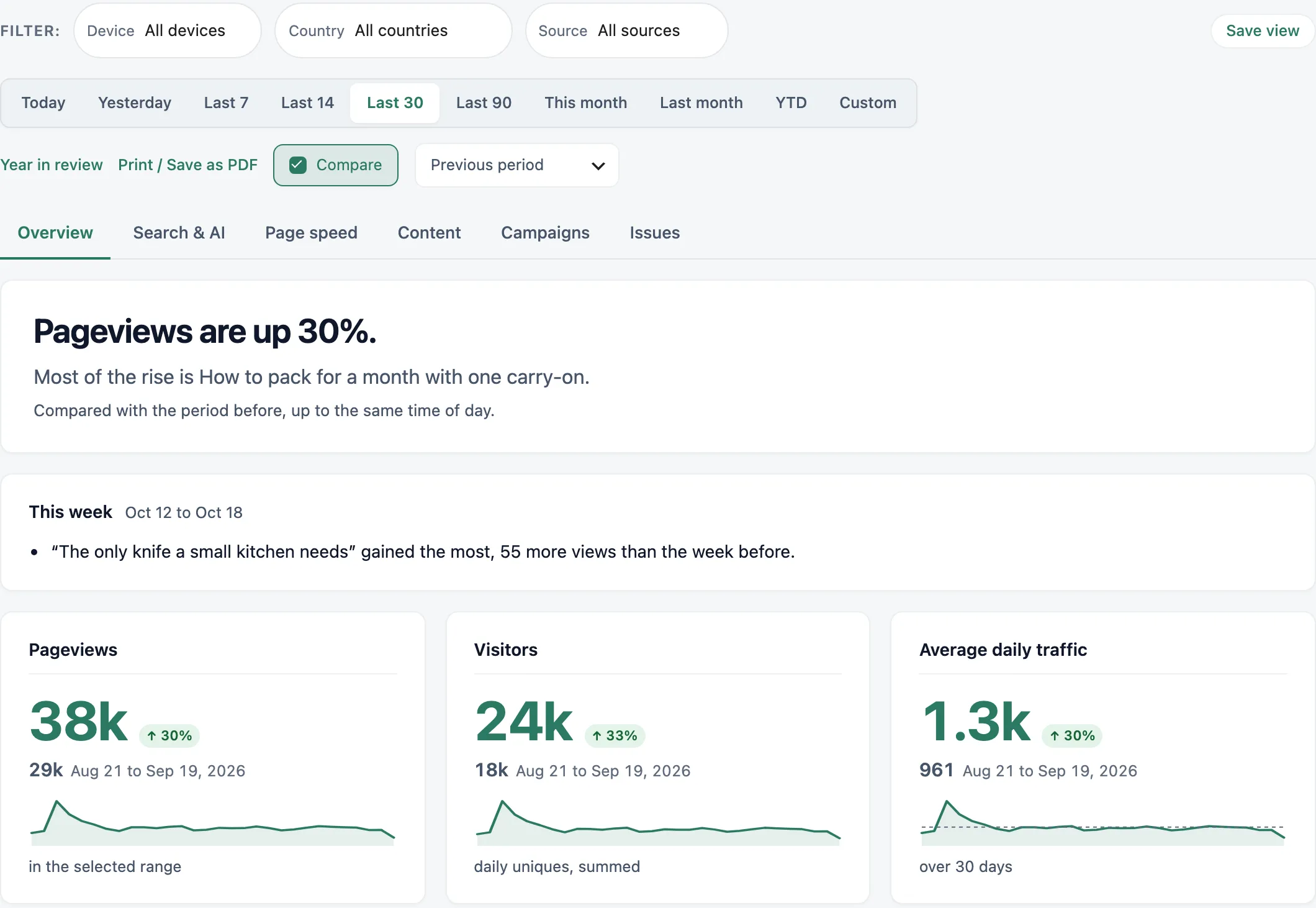
Date range
The row of buttons sets the period: Today, Yesterday, Last 7, Last 14, Last 30, Last 90, This month, Last month and YTD. Custom opens a Start and End date picker; click Apply. On a phone, the same choices are in one drop-down.
Days follow your site’s timezone, as set in WordPress under Settings, General.
Comparison
“Compare” is on by default. With it on, each number carries its change against another period, and the traffic chart draws that period as a second line. The “Compare with” drop-down picks which one: “Previous period”, the period of the same length just before, or “Same period last year”. The compared figure and its dates sit under each headline number. If those dates fall in imported history, a note says which tool it came from, so the year-earlier comparison works from the day you import. When the range includes today, the previous-period comparison stops at the same time of day, so a morning isn’t measured against a whole day. Click “Compare” to switch the comparison off.
Filters
The Filter row has three drop-downs:
- Device: Mobile, Desktop or Tablet.
- Country: your top countries for the range.
- Source: Direct, Search, AI assistants, Social or Other sites.
You can also filter by a page or a referrer. Click the filter icon on a row in Top pages or Where visitors come from (it’s titled “Filter by” and the name).
Every number on the page answers the filters you set. Each active filter shows as a tag such as “Page is Pricing” or “Device is Mobile” that you click to remove, and “Clear all” removes them together. Filters and the range stay in place when you switch tabs.
Vireo keeps daily totals per dimension, so a few combinations can’t be answered. A card that can’t answer says “Not shown with these filters” instead of showing a figure from the wrong table. Time on page and Bounce rate aren’t split by filters at all, and the hourly chart shows days while a filter is on.
Saved views
“Save view” names the date range, comparison and filters on screen. Pick it again from “Saved views…” in the filter row; “Forget view” deletes the one you’re on. Views are per user.
Links to a filtered view expire after about a day. If you open an old one, Vireo shows the default range and says so.
Print or save as PDF
“Print / Save as PDF” on the Overview, and on a post’s or a referrer’s own screen, opens the browser’s print dialog. The printed page drops the menus and controls, keeps the report, and says which site it is and when it was printed. Choose “Save as PDF” in the print dialog to get a file.
Tabs
The Overview has up to six tabs. A tab with nothing to show for the range is left out, so a new site may see only one or two.
- Overview: the summary, the traffic chart, What changed, Top pages, Where visitors come from, Top countries, Technology and your notes. See The Overview tab.
- Search & AI: AI assistants and the searches that found you.
- Page speed: Core Web Vitals from real visitors and Google’s lab test.
- Content: with Vireo Pro, what people read and how. See Pro reports.
- Campaigns: your events, and with Vireo Pro, campaigns, goals, outbound clicks and revenue.
- Issues: broken links.
The tab is kept in the address, so a reload or a shared link opens on the same tab.
Rearrange the Overview
The Traffic chart, What changed, Top pages, Where visitors come from, Top countries and Technology can be put in any order. Drag a card by the handle at its top, or focus the handle and use the arrow keys. The order is saved for your user only. “Reset layout” under the cards puts them back.
Site selector
Once you connect another site, a selector next to the Vireo name switches the dashboard between this WordPress site and the others.
Elsewhere in WordPress
- The admin toolbar shows today’s pageviews and links to the Overview. Turn it off under Settings, General, Toolbar.
- The WordPress Dashboard gets a Vireo Analytics widget: pageviews and visitors today, a “Right now” count, a chart of the last 14 days, and the top pages and referrers for the last 7 days.
- The Posts and Pages lists get a “Views (30d)” column you can sort by. See Pages and posts.
- Tools, Site Health warns you if Vireo stops recording visits. See Site Health messages.
On Vireo’s own screens, notices from other plugins and themes are hidden, so their banners don’t sit on top of your numbers. WordPress’s own notices, such as the update prompt, stay, and so do Vireo’s and Vireo Pro’s.