
Both live under Vireo Analytics, Goals.
Create a goal
- Click “Add goal”, or “Create your first goal” on a new site.
- Give it a Name, such as “Newsletter signup” or “Reached pricing page”.
- Pick the Type and fill in the Pattern:
| Type | Pattern | Example |
|---|---|---|
| Page visit | A path. * matches anything except /, ** matches anything. |
/thank-you or /pricing* |
| Event | The event name as your site sends it: lowercase a-z, 0-9, _ and -. |
newsletter_signup |
| Outbound click | A host, or a host and path with wildcards. | partner.com or partner.com/ref/* |
| Click on an element | A CSS selector for the button or link. No code on the site: Vireo listens for the click and counts it as an event named after the goal. | .pricing-cta or #buy-now |
| Click on a link | The address the click leads to, as a glob. | /signup/** or shop.example.com/** |
| Scroll depth | A path pattern for the pages to read, plus a Depth (75% by default). Completes when a reader scrolls past that depth. | /guides/* |
- Optionally give it a Value: a monetary amount credited to each completion. Leave it at 0 to count completions only.
- Keep Active ticked, and click “Create goal”.
Before saving, “Preview against historical data” runs the pattern over the last 30 days so you can check it matches what you expect. Click “Run preview”. The preview isn’t offered for the two click types.
Event goals count the events you send with vireo('event', ...) or turn on as auto-events. Outbound-click goals use Pro’s outbound click tracking.
The goals list
Each goal shows its Name, Type, Pattern, Value, “This week” and “All time” completions, and Status. Disable a goal to keep its history without recording new completions, or Delete it with its history.
“This week” counts days in your site’s timezone.
Goals on the dashboard
The Campaigns tab of the Overview gets a Goals card for the range: each goal’s Completions, Rate and Value. Rate is people, not events: the share of visitors who completed the goal, so it never goes over 100%.
Funnels
A funnel counts people who completed one goal and then went on to complete the next, in order, on the same day. You need at least two active goals.
- Under Funnels, in “New funnel”, give it a name such as “Checkout”.
- Choose a Mode:
- In order (the default): every step, each after the one before it.
- Flexible: first and last steps required; the steps between can be skipped.
- Strict: every step in order, and nothing out of sequence: a later step reached first doesn’t count.
- Pick a goal for each Step, in the order visitors should reach them, up to 10. Leave a row blank to stop there.
- Click “Add funnel”.
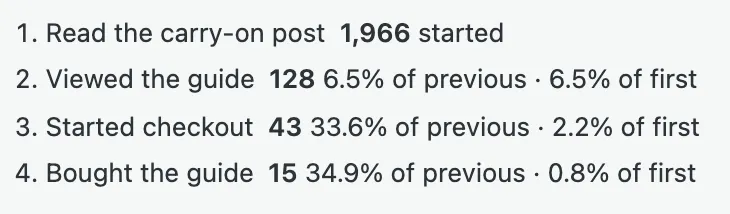
Each funnel card is headed with its mode, “this week” and “same-day window”, and shows how many people started, how many reached each step, each step as a share of the previous one and of the first, and the share who finished.
Same day is the limit. Visitors are counted with a secret that changes at your site’s midnight, so someone who starts today and finishes tomorrow can’t be recognised as the same person.
Deleting a funnel doesn’t touch its goals or their history.
wp vireo funnel shows the same numbers in a terminal. See WP-CLI.